WeChat Pay/Alipay
To integrate wallet payment with the Direct Model, three terminal modes are supported for different application scenarios. Pass the correct paymentTerminal value to receive the appropriate response.
paymentTerminal | Usage | Description |
|---|---|---|
SDK | Mobile App | Switch to the wallet app |
WAP | Mobile browser | Switch to the wallet app or present the payment webpage |
PCWEB | PC browser | Present QRCode for wallet app to scan |
Only paymentTerminal=SDK returns the payment result synchronously to your application. For WAP and PCWEB, you must implement an asynchronous result-handling mechanism.
SDK
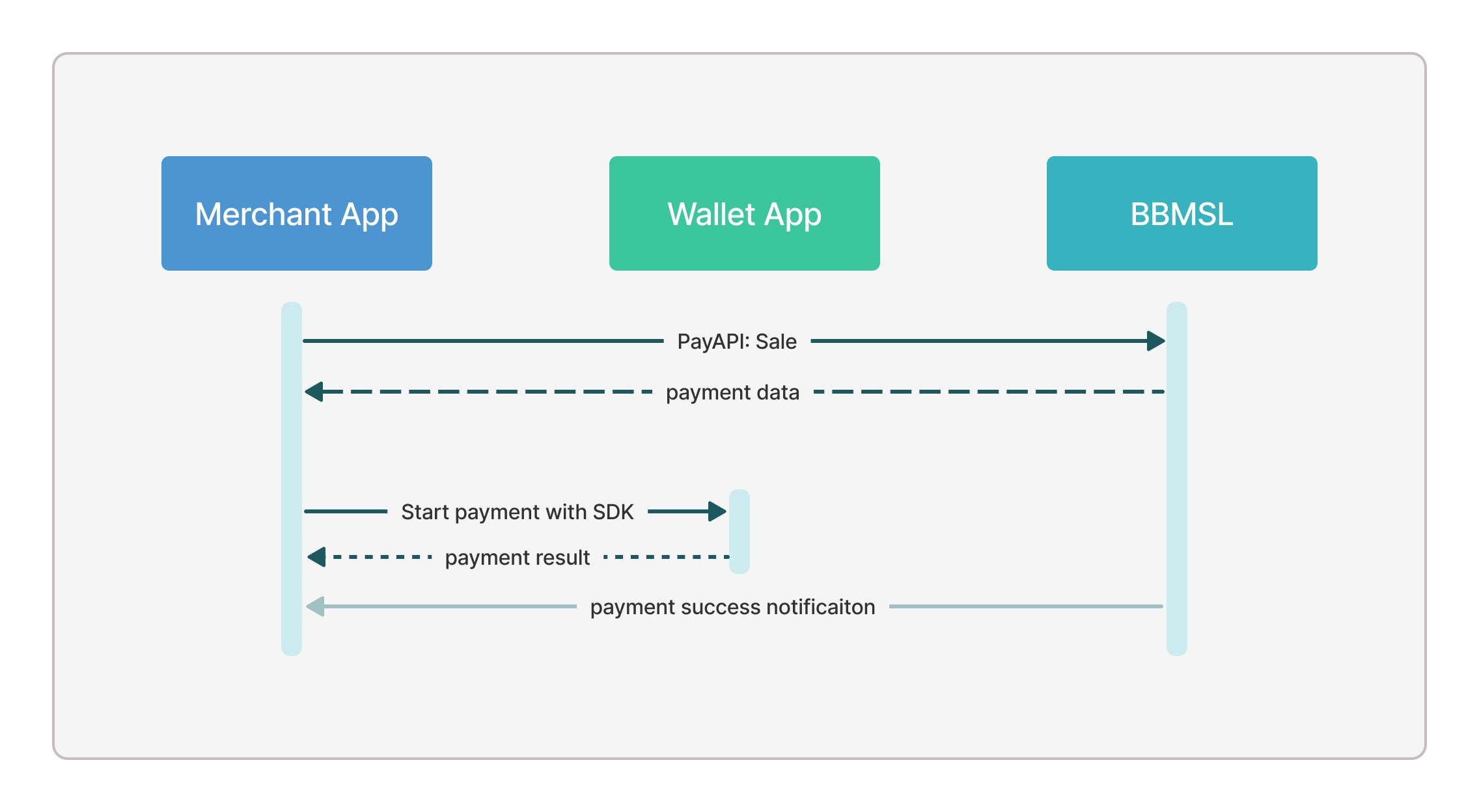
What you do: Call PayAPI Sale: direct/sale to receive the wallet-specific parameters from BBMSL, then invoke the wallet SDK to complete the payment.
Expected result: The wallet SDK processes the payment and returns the result directly to your application.
Next step: Handle the result in your application workflow.
For mobile app integration, the wallet app is called directly using its SDK. The standard flow is shown in the diagram below.
Alipay
Follow the Alipay documentation to complete SDK integration.
After receiving the response from PayAPI, call the method below to invoke the Alipay app and finish the payment.
- Swift
- Java
AlipaySDK.defaultService().payOrder(orderStr: bbmslPayApiResponse.alipayData,
  fromScheme: appScheme) {(result) in

}
PayTask alipay = new PayTask(YourActivity.this);
final String result = alipay.pay(bbmslPayApiResponse.getAlipayData(), true);
WeChat Pay
- Create a developer account on the WeChat Open Platform.
- Register your mobile app on the WeChat Open Platform and send the
appIdprovided by WeChat to BBMSL technical support.
Integrate the SDK by following the guidelines here.
Call the method below to invoke WeChat Pay and complete the payment.
- Swift
- Java
let wechatOrder = bbmslPayApiResponse.wechatOrder
let request = PayReq()
request.partnerId = wechatOrder.partnerID
request.prepayId = wechatOrder.prepayID
request.package = wechatOrder.packageValue
request.nonceStr = wechatOrder.nonceStr
request.sign = wechatOrder.sign
request.timeStamp = wechatOrder.timeStamp
WXApi.send(request)
WechatOrderRes wechatOrder = bbmslPayApiResponse.getWechatOrder();
PayReq request = new PayReq();
request.appId = wechatOrder.getAppId();
request.partnerId = wechatOrder.getPartnerId();
request.prepayId = wechatOrder.getPrepayId();
request.packageValue = wechatOrder.getPackageValue();
request.nonceStr = wechatOrder.getNonceStr();
request.timeStamp = wechatOrder.getTimeStamp();
request.sign = wechatOrder.getSign();
boolean result = api.sendReq(request);
WAP
What you do: Use the checkoutUrl returned by PayAPI Sale to redirect the customer in a mobile web browser. The wallet app is launched if installed; otherwise, a sign-in and payment webpage is shown.
Expected result: The wallet service provider handles the redirection decision. BBMSL sends the payment result to your notifyUrl.
Next step: Implement an asynchronous result-handling mechanism (for example, a websocket or polling task) to receive and process the payment result. See Result Notification for details.
The flow is summarized in the diagram below.
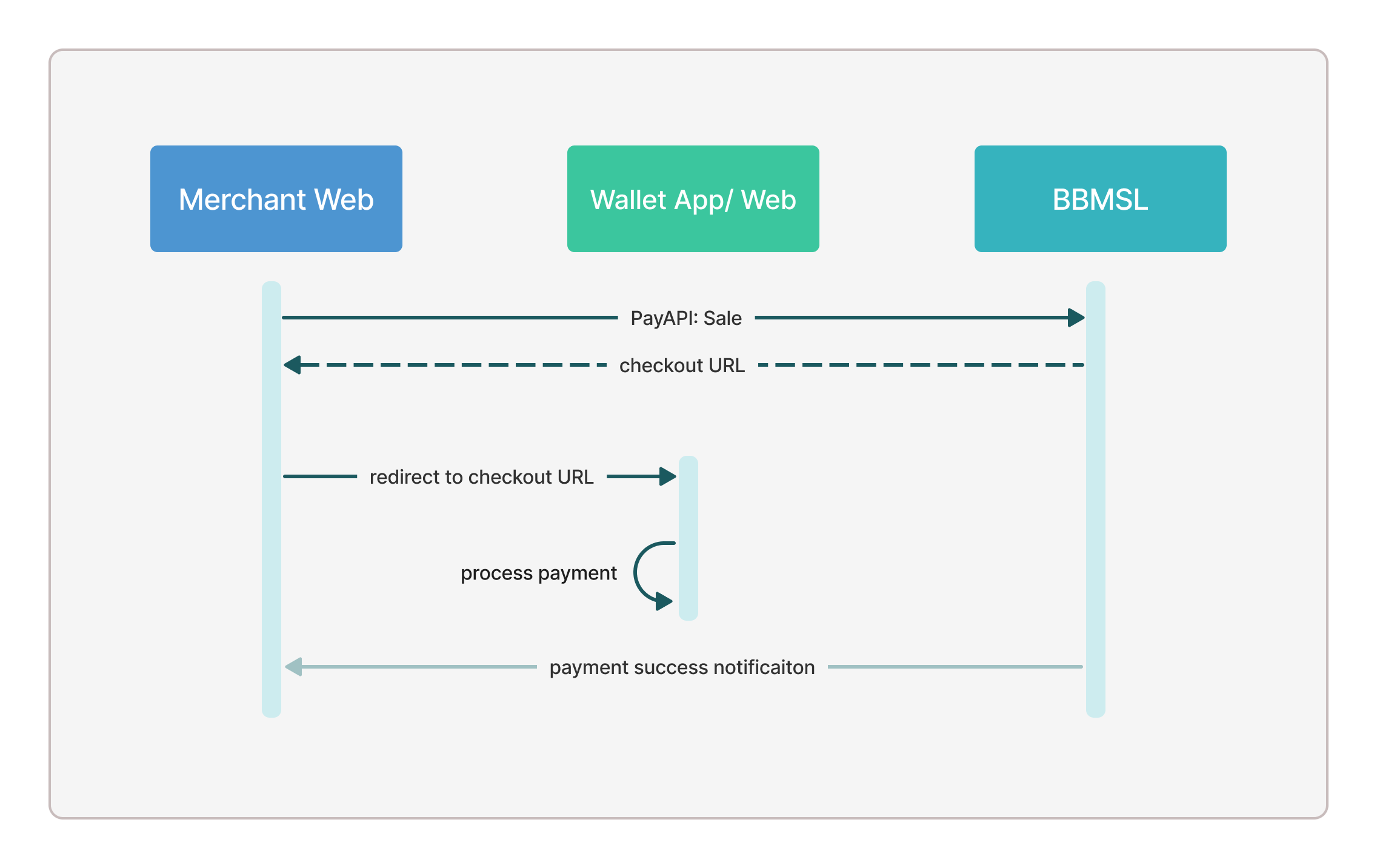
The redirection behavior depends on the wallet account configuration.
PCWEB
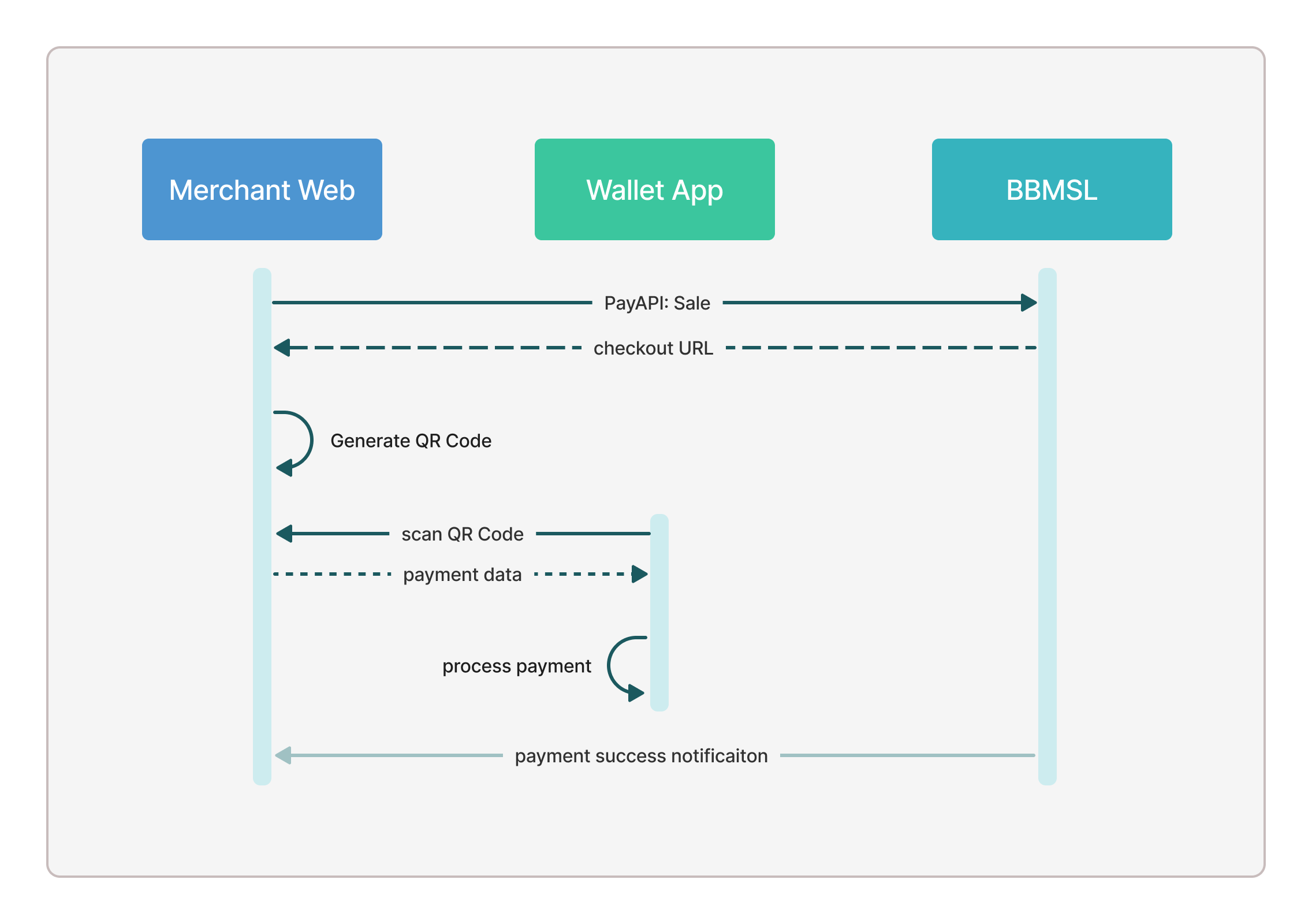
What you do: Display a QR code to the customer using the checkoutUrl returned by PayAPI Sale. The customer scans the QR code with their wallet app to complete the payment.
Expected result: The payment is processed on the customer's device. BBMSL sends the payment result to your notifyUrl.
Next step: Implement an asynchronous result-handling mechanism to receive and process the payment result. See Result Notification for details.
For web integration in a PC browser, display the QR code from the checkoutUrl. The payment flow is shown below.